Fascinating look at "The Beauty of Data Visualization"
David McCandless turns complex data sets like worldwide military spending, media buzz, Facebook status updates and more into beautiful yet simple diagrams. He proposes design as the tool we use to navigate today’s information glut, finding unique patterns and connections that may just change the way we see the world. (Recorded at TEDGlobal 2010, July 2010 in Oxford, UK. Duration: 18:17)
Showing posts with label teaching. Show all posts
Showing posts with label teaching. Show all posts
Monday, June 13, 2011
Tuesday, June 7, 2011
Harness the power of digital images with Photoshop
This hands-on workshop empowered you to effectively utilize your digital images for pedagogical & professional projects. The workshop explored cropping techniques, creating composites from a set of photos, highlighting your point right on the photo and organizing groups of images.
Online workshop Resources in Sakai here and a refresher video:
How will you implement what you learned in this workshop in a fall 2011 course?
Online workshop Resources in Sakai here and a refresher video:
How will you implement what you learned in this workshop in a fall 2011 course?
Get a grip on Groupwise
Whether you have 10+ years of accumulated email or just this year’s, this hands-on workshop provides an antidote for email disorganization as well as extremely useful guidelines for handling email overload so that you can reclaim time for other tasks.
How will you implement what you have learned in the workshop in your teaching this fall?
 |
| Online Groupwise resources in Sakai here |
Your web presence: the good, the bad, & the ugly
What is your web presence? Why might it matter? This workshop helps you to answer these questions and examines the options to create or update your Scripps College website (pages.scrippscollege.edu/~yourusername) or department website using
How you will implement what you learned in this workshop in your teaching this fall?
- Dreamweaver web design software
- the Faculty Site Starters program
- iWeb and WordPress software
- perhaps Blogger should have been included....
How you will implement what you learned in this workshop in your teaching this fall?
Mobile Computing ~ who, what where, when &, most importantly, why
Mobile computing swept into our lives @ an amazing pace. This workshop explores the pedagogical, professional and personal potentials & pitfalls of mobile devices (smart phones, iPads, etc.
Online workshop Resources in Sakai here
How you will implement what you learned in this workshop in a fall 2011 course?
Online workshop Resources in Sakai here
How you will implement what you learned in this workshop in a fall 2011 course?
Monday, March 2, 2009
How students can share documents with Sakai

Sakai is the Claremont College's online collaboration and learning environment. Essentially, every Sakai course site is a full-featured web site with extensive, integrated built-in online tools — discussion board, email, announcements, chatroom, gradebook, resource area for any files you would like to share including web links to external sites, calendar, wiki, and much more.
Sharing resources
Many faculty have found Sakai's Resource tool useful for sharing web links, documents, and other types of files with students. Although it is not intuitively obvious, Sakai's Resource tool can enhance communication and collaboration among students too.
How students can share documents and other files
- In your Sakai Resources, create a new folder by clicking the "Add" Tab next to the Folder "[Class name] Resources."
- Select the "Create Folders" link from the drop-down menu.
- You then need to name the folder. You can name it Paper 1, Paper 2, etc. or whatever name you want, as long as it's clear to the students which which should go where.
- If you will be adding more than one folder, you can select the "Add Another Folder" option and you will then be prompted to enter the name of the next new folder; you can do this for as many folders as you would like to add.
- When you are finished adding folders, click the "Create Folders Now" button. Your folder(s) will appear in the "[Class name] Resources.
- To allow your students to upload their papers into these folders, you will then need edit the folder's permission as follows:
- Click on the Actions drop-down menu next to the folder.
- From the drop-down menu, select the "Edit Folder Permissions" link for the folder.
- To allow your students to upload documents, the "new" box needs to be checked for the Student role.
- You can also decide whether the students are able to revise or delete their own documents and/or those of their classmates. When the correct boxes are selected, click on the "Save" button.
- Options for folder permissions include:
new: Add new resources
read: View and download resources (checked by default)
revise.any: Modify any resources
revise.own: Modify own resources
delete.any: Remove any resources
delete.own: Remove own resources
all.groups: Allows participants to see all resources, even those assigned to specific groups - When the correct boxes are selected, click "Save" button.
- Claremont Collaborative Learning Environment
- Login to your Sakai account and explore the helpful links at the bottom of your My Workspace tab.
- SC Faculty Support Sakai project > Resources > Sakai Resources - includes links to useful campus and web online resources and the Spring 2008 Student Survey results.
https://sakai.claremont.edu
- Login to your Sakai account and explore the helpful links at the bottom of your My Workspace tab.
- Student instructional technology assistants can help you in your office, over the telephone, or in the Scripps Faculty Lab. For more information, please visit:
www.scrippscollege.edu/campus/it/it-fits/
To make an appointment, please fill out our online request form:
www.scrippscollege.edu/campus/it/it-fits/help.php
Monday, April 21, 2008
IT works: student perspectives
Alysha Chan '08, Catherine Magee '10, Carol Toro '10, and Nancy Townsend '09
Overview - What do students value in instructional technology (IT) used on campus today? How do students use IT in and outside of the classroom? What do students think works best in their learning environments?
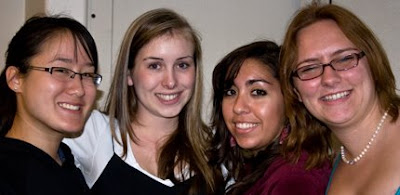
Overview - What do students value in instructional technology (IT) used on campus today? How do students use IT in and outside of the classroom? What do students think works best in their learning environments?

Carol (foreign languages major)
Carol finds Sakai, the college's online learning and collaborative environment useful. Some Sakai tools have made her life easier:
Answer: It was graded. We had a discussion question every two weeks.
Kate (Biochemistry major)
Kate described two creative uses of IT:
Alysha (3/2 Engineering major, Hispanic Studies minor)
Most professors don't do anything that great....Two things I find interesting:
What IT works:
Carol finds Sakai, the college's online learning and collaborative environment useful. Some Sakai tools have made her life easier:
- Announcements - an effective way to reach everyone in the class so students from all of the colleges get the info. This doesn't always work with email.
- Gradebook - helps me track my progress all semester, not just at the end.
- Resources - articles, course notes, etc., are accessible from anywhere, like Starbucks. It's our choice if we want to waste paper.
- Syllabus - never gets lost.
- Wiki - a lot of professors don't use this tool. It's helpful for group projects, to delegate assignments and see progress - like a digital white board.
- Discussion - a more comfortable environment for a shy person because you can think about what you want to say and then formulate your answer.
Answer: It was graded. We had a discussion question every two weeks.
Kate (Biochemistry major)
Kate described two creative uses of IT:
- Prof. Poon's ochem.com website has an exam archive with detailed answers, Quicktime tutorials: 23-30 minutes - with pre-lecture
 information that helps. It's a lot easier to see electrons bond in a video. There are other resources there.
 - Prof. Poon also has a remote control clickers. They encourage participation because it's worth 7% of our grade. It's interactive. And it lets the professor judge how well students understand the materials.

Alysha (3/2 Engineering major, Hispanic Studies minor)
Most professors don't do anything that great....Two things I find interesting:
- Document camera - allows you to zoom into documents and project on a screen.
- Integration of other media into PowerPoint (i.e., a YouTube video in a Spanish class)
What IT works:
- Resource tool in Sakai and other electronic resources
- Document camera with art books
- PowerPoint or slides
- AV Department: access to video, photo, and audio equipment
- When professors allow different mediums for projects, like digital collages and websites, instead of only written papers
- Video presentations
- More consistent websites
- More electronic communication from professors to students
- Wish more professors would use Sakai, and more tools in Sakai
- Scanners in the library
Monday, April 7, 2008
Commenting on student papers with Sakai & MS Word editing features
Cecilia Conrad
Vice President and Dean of the Faculty
Overview - For several years, Cecilia Conrad has asked her students to submit their papers electronically. In the beginning, they submitted via email and that was hard to manage. However, with Sakai, students use drop boxes to submit papers. She write comments on the papers using the MS Word editing features and return them to their drop box. No paper need exchange hands and she has a portfolio of each student's work available for her review even after they graduate.

Vice President and Dean of the Faculty
Overview - For several years, Cecilia Conrad has asked her students to submit their papers electronically. In the beginning, they submitted via email and that was hard to manage. However, with Sakai, students use drop boxes to submit papers. She write comments on the papers using the MS Word editing features and return them to their drop box. No paper need exchange hands and she has a portfolio of each student's work available for her review even after they graduate.

Electronic papers never (ok, rarely) get lost, you know exactly when a paper is submitted, and the paper can be reviewed, even years later, if a student requests a recommendation. For these and other reasons, for the past 4 or 5 years, Dean and economics professor Cecilia Conrad has only accepted electronic paper submissions.
Sakai
She sees Sakai, the campus' online learning and collaboration environment, as a godsend. Sakai allows her to easily manage and organize student writing assignments. Unlike email (with disk quotas and no inherent organization), Sakai provides faculty and students with a built-in evaluation environment. Conrad uses Sakai extensively. She uses a Sakai project site to collaborate on a writing project with a colleague at Yale. In her course sites, the drop boxes store all drafts of student work, the grade book keeps students informed about their progress, the syllabus tool assures that course information is up to date, and her class announcements reach students on 5 campuses instantly.
Once she got used to it, Conrad found it faster to grade papers electronically. It is also convenient. She can download papers from Sakai into a file on her laptop and grade them on a plane.
How to grade electronic paper submissions with Sakai
Beyond grading papers
When grading electronic papers, a comfortable reading position is important. Sometimes it's useful to zoom up to 200% for easier reading.
Student reactions
Conrad's students seem to like this grading approach. It keeps their professor organized. Comments are always legible. Submitting papers through Sakai gives some flexibility for the submit time. And it save students money on printing. Most students also look at comments online.
Online resources
Once she got used to it, Conrad found it faster to grade papers electronically. It is also convenient. She can download papers from Sakai into a file on her laptop and grade them on a plane.
How to grade electronic paper submissions with Sakai
- Have students submit their paper in Sakai using the dropbox.
- Open student papers in Microsoft Word. "Save to Disk" in a specific location is ideal.
- Make sure the document is set to do Track Changes.
- Students write drafts for most classes. For these, use a two stage reading process. The first reading is a cursory overview, a quick read and look at the overall paper structure. For the second reading, go back and focus on a particular section.
- Tracking changes let students see how you edit the draft/paper. Use the "Insert Comment" tool from the Track Changes tool bar to explain why you have made suggested changes, and other comments.
- Change the document title when you save a copy of the reviewed paper, for instance by adding your initials to the document title and/or a version number.
- Upload the saved commented document with the new file name to the student's drop box.
If you have students revising their draft and re-submitting, you can use the Compare Documents feature in Word. The Compare and Merge Documents feature takes 2 documents and highlights what is different, a way to spot changes that have been made between drafts.
Beyond grading papers
- This process is particularly useful when faculty and students have an on-going project, for example with a senior thesis. With a slight change of file name, the commented files do not replace the originals.
- Peer editing: You can set up Resource folders and assign access to student groups so they can comment on each other's papers. This also works well for group presentations.
When grading electronic papers, a comfortable reading position is important. Sometimes it's useful to zoom up to 200% for easier reading.
Student reactions
Conrad's students seem to like this grading approach. It keeps their professor organized. Comments are always legible. Submitting papers through Sakai gives some flexibility for the submit time. And it save students money on printing. Most students also look at comments online.
Online resources
- Collaborate Effectively with Track Changes (Mac)
- Tutorial on Tracking Changes with Microsoft Word (Windows)
- Electronic Grading Tutorial (for Blackboard but useful information for Sakai users too)
Monday, March 24, 2008
Moving the image: screen-based art & technology
T. Kim-Trang Tran, Associate Professor of Art
Overview - Someone once said to Prof. Tran, "We have the media we deserve." Indeed, now that video and computer technology have enabled us all to be producers as well as consumers, what kind of do-it-yourself media do we have? Come see some of the tools students learn in order to be critical producers of art and media and how they've used them. Featuring non-linear video editing with Final Cut Pro, motion graphics with After Effects, and computer animation and interactivity with Flash.

Tran showed several innovative video projects produced by students in her video editing courses, and discussed the software that her students use: Final Cut Pro for non-linear editing in her Introduction to Video course, After Effects for motion graphics for video in her Intermediate Video course, and Flash for animation and visual effects for the web in her Advanced Web Projects course.
Video editing software has changed the way Tran teaches. It enables students to "work portable," to develop their video projects in the Scripps computer labs or on their own computers. This mobility opens up class time to discuss media history, theory and concepts with students.
Tran challenges students to not only learn new tools, but to apply their knowledge in conceptually interesting ways. She emphasized that her teaching is not about software mastery as much as about art history, conceptual thinking skills, and creative problem solving.
 Related link
Video Data Bank - T. Kim-Trang Tran: Blindness Series
Overview - Someone once said to Prof. Tran, "We have the media we deserve." Indeed, now that video and computer technology have enabled us all to be producers as well as consumers, what kind of do-it-yourself media do we have? Come see some of the tools students learn in order to be critical producers of art and media and how they've used them. Featuring non-linear video editing with Final Cut Pro, motion graphics with After Effects, and computer animation and interactivity with Flash.

Video editing software has changed the way Tran teaches. It enables students to "work portable," to develop their video projects in the Scripps computer labs or on their own computers. This mobility opens up class time to discuss media history, theory and concepts with students.
Tran challenges students to not only learn new tools, but to apply their knowledge in conceptually interesting ways. She emphasized that her teaching is not about software mastery as much as about art history, conceptual thinking skills, and creative problem solving.
Related linkVideo Data Bank - T. Kim-Trang Tran: Blindness Series
Monday, March 10, 2008
Accessing history: technology in teaching and research
Tony Crowley, Hartley Burr Alexander Chair in the Humanities
Overview - How can online resources be used to enhance teaching and research? Read about one professor's work with the Claremont Colleges Digital Library to facilitate teaching and using online databases for research.
The online library database provided a printable, full-text image of the first edition of the play. It proved to be a fantastic resource for different representations of vernacular speech during the mid-eighteenth century: characters speak in Irish, Lancashire, and Liverpool dialects. The play puts eighty years into the perceived history of Liverpool dialect and overturns the history of vernacular Liverpool dialect as we know it today. Significantly, the full citation accompanying the play provided the physical location of what may be the only first edition of this play-the Huntington Library.
It took Tony many hours to annotate the murals with keywords for each image so that the collection is searchable by non-experts who might not recognize the people or other reference in the murals. The images are scanned in high enough quality to allow online magnification of details.
Tony asks his students to do research projects with this primary source image collection. Students might explore a key moment, for instance Easter 1916, or a significant location or year. He finds that students produce interesting analyses of these historical materials. This public collection allows students anywhere to examine the murals as representations of history.
Overview - How can online resources be used to enhance teaching and research? Read about one professor's work with the Claremont Colleges Digital Library to facilitate teaching and using online databases for research.

Research
Eighteenth Century Collections Online, a library database with nearly 150,000 English-language primary source documents, provided a missing link in Tony's current research on the history of Liverpool's vernacular language. His quest to find the first edition of "The Sailor's Farewell," a British play published in 1768, proved unsuccessful via on-site visits to major libraries in the United Kingdom. The online database was the only way to find out that there was a first edition of the play still in existence, and where it is located.The online library database provided a printable, full-text image of the first edition of the play. It proved to be a fantastic resource for different representations of vernacular speech during the mid-eighteenth century: characters speak in Irish, Lancashire, and Liverpool dialects. The play puts eighty years into the perceived history of Liverpool dialect and overturns the history of vernacular Liverpool dialect as we know it today. Significantly, the full citation accompanying the play provided the physical location of what may be the only first edition of this play-the Huntington Library.
Teaching
Tony contributed photographs of nearly 600 murals from Northern Ireland to the Claremont Colleges Digital Library (CCDL). The murals, painted between 1979 and 2004 during the recent period of Troubles, are an important political history resource because there are very few other mural images from 1979-1996. As the CCDL collection indicates, "The images are records which include historical representation, political standpoints, community concerns, forms of ideological address. They range from overtly political declaration, to brutal depictions of the conflict, to humour and irony."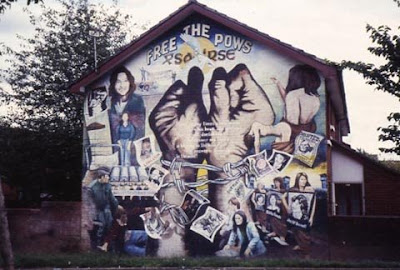
Tony asks his students to do research projects with this primary source image collection. Students might explore a key moment, for instance Easter 1916, or a significant location or year. He finds that students produce interesting analyses of these historical materials. This public collection allows students anywhere to examine the murals as representations of history.
Online Resources
- Claremont Colleges Digital Library
- CCDL Mural of Northern Ireland Collection
- Tony Crowley' presentation: "Speaking through walls: political murals in Northern Ireland" (QuickTime)
- Electronic Journals
- Databases
- Tony Crowley's Scripps faculty biography
Monday, February 25, 2008
Geek from birth or nurtured technology
Veronica Hart '07, Assistant Director of Technical Services, Development
Overview: How technology in her life inspired Veronica to come to Scripps, minor in computer science, work for IT, and finally get a wonderful job! Quick overview of how technology and education have crossed paths in her life from working with the dynamics of learning with Lego Mindstorm robots to IT-FITS training to her current job in Development Services.
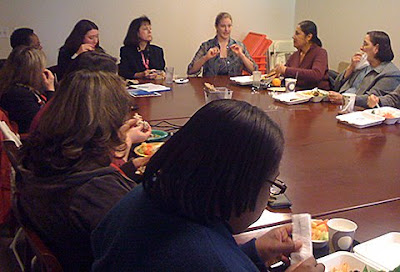
Overview: How technology in her life inspired Veronica to come to Scripps, minor in computer science, work for IT, and finally get a wonderful job! Quick overview of how technology and education have crossed paths in her life from working with the dynamics of learning with Lego Mindstorm robots to IT-FITS training to her current job in Development Services.

Are people who are comfortable with computer technology simply born that way? Or is tech savvy nurtured by experience? Although she feels like she was "geek from birth," Veronica Hart kicked off the Spring 2008 IT Tech Bytes Brown Bag lunch series with an engaging, insightful, and technology-free presentation about the factors that led her to embrace computing.
Veronica shared how her family, early involvement with computing gaming, and various experiences as a student at Scripps led her to her current position as Assistant Director of Advancement Services.
Veronica's father worked in the Los Alamos Lab in New Mexico; built the first electronic slot machine. Her father insured her access to computers and modeled fascination and enthusiasm for computers. Veronica learned to use the Internet in school. For her, the turning point was the discovery of a popular online multi-player game. She became so adept at Aetolia, a text-based medieval fantasy MUD, that the game makers asked her to help them to develop the game while she was still in high school. Eventually, her love of fantasy found a home in computer science. Before coming to Scripps, Veronica also enjoyed an internship working with Lego Mindstorm robots at the Santa Fe Institute.
Why did Veronica choose Scripps? Like many computer geeks, Veronica's early experience with computers came from experience, not formal study. She took no computer science classes in high school. Veronica wanted to go to college in Southern California because of visits to her grandmother's home in Alta Dena. When she stepped on campus, she knew that Scripps was it.
At Scripps, Veronica had the opportunity to build games. She began her undergraduate studies as a Physics/Computer Science major. There were only two other Scripps women CS majors in her class. She took as many classes at Pomona and Mudd as at Scripps, including the first class on Gender and Computing at Harvey Mudd. After two years she switched to Studio Arts with a minor in CS. She got involved with the Game Developers Conference. Her senior thesis was on "Breaking Gender Stereotypes with Games," specifically with World of Warcraft, a massive multiplayer online role-playing game.
Veronica wrote the Users Guide for the data projector at the lunch session. She worked for Scripps IT as a lab consultant her freshman year, and moved up in the department over the next four years. Veronica was the first student instructional technology assistant hired for the IT-FITS (Faculty In-Office Technology Support) program. As an art major, working for IT gave her a direct daily connection to technology. She learned a lot about hardware, software, training, teamwork, and problem solving that excited her. Her current position in Development benefits from these experiences-and lets her work with code and databases.
Q&A
Many students seem so wrapped up in texting that they don't feel comfortable with face-to-face interaction. What are some things that helped you stay connected to the physical world?
The kinds of things that Scripps does: movies on the lawn and taking classes like sculpture. Maybe no cell phones should be allowed at events.
You explain technology so well. Do you think that women are better at explaining these things?
I think that women are better translators between techies and non-techies. When I'm with my Mudd friends, sometimes I get lost. There are times when you have to be social. Scripps helped me develop my communications skills.
Do you think that the place to approach young women is at the high school level so they can find out about women in CS?
Yes. More and more women are in computer science as role models.
If you wanted to go to school in Southern California, why not UCLA or other colleges with more CS emphasis?
I didn't have the technical knowledge. No CS courses in high school. Many of the boys teach themselves. When I first stepped foot at Scripps, I knew it was the right place. The architecture, the physical campus felt like a place where people are well taken care of. There was an appreciation for being outside too. For education. For women.
How did they sell Scripps to you?
The multi-college consortium — I could take classes at all the colleges. I sat in on HMC classes.
When you started at Scripps, was there a big transition in learning? How did you make that transition?
Yes. Outdoor orientation really helped. A great start. The smallness of the college... Finding professors for advice. I never felt a lack of resources. I never expected to feel that special treatment as a staff member too. I'm working with great people. I'm constantly grateful for the opportunity to give back.
Monday, February 18, 2008
IT brown bag lunch series: tech bytes

Informal discussions about current academic uses of technology by and for Scripps faculty, students and staff –focused around weekly presentations by members of the Scripps community.
Monday, Feb. 25 - April 21, 2008 (noon - 1:00pm)
South Meeting Room, Malott Commons


Subscribe to:
Posts (Atom)